This is an Indonesian language based blog

Pertama2 gw mo ngucap Bismillahirohmanirohim
Trus, mohon maap kalo nih blog gw tulis ngga pake bahasa formal, nyante aja lah bro.
Abis itu, gw cuma nulis saat gw mau atau butuh karena tujuan nih blog cuma sebagai reminder aja karena gw pelupa & belum banyak pengalaman tentang Linux.

Selasa, 28 April 2015

Downgrade ColorOS 1.0.0 Ke Versi Stabil 140717

PERINGATAN, KALO DARI UPDATE OTA YG ADA FUNGSI REPARTISINYA, GW BLOM PERNAH NYOBAIN, JADI KEMUNGKINAN ERROR BISA 80% MULAI LANGKAH KE 7


Bahan:
1. Download firmware stabil 140717 di : 
http://www.mediafire.com/download/z1j932i9v7jddbe/R827_11.A.10_OTA_INT_010_all_140717_wipe.zip

Cara:
1. Pastiin lu belom ganti recovery ke custom recovery model cwm, ctr, twrp. Harus recovery original. Kalo udah terlanjur ganti & ga punya backup asli, tanya master yg laen.
2. Kalo download firmware 140717 pake hape, keluarin dari folder Downloads, bisa copy file abis itu paste diluar folder Downloads atau move, silahkan aja yang penting ngga di dalam folder manapun. Kalo download firmware 140717 dari PC, yaudah taro di drive sdcard, jangan dimasukin ke folder manapun.
3. Matiin tuh hape, pencet tombol power sama volume down barengan biar masuk recovery original.
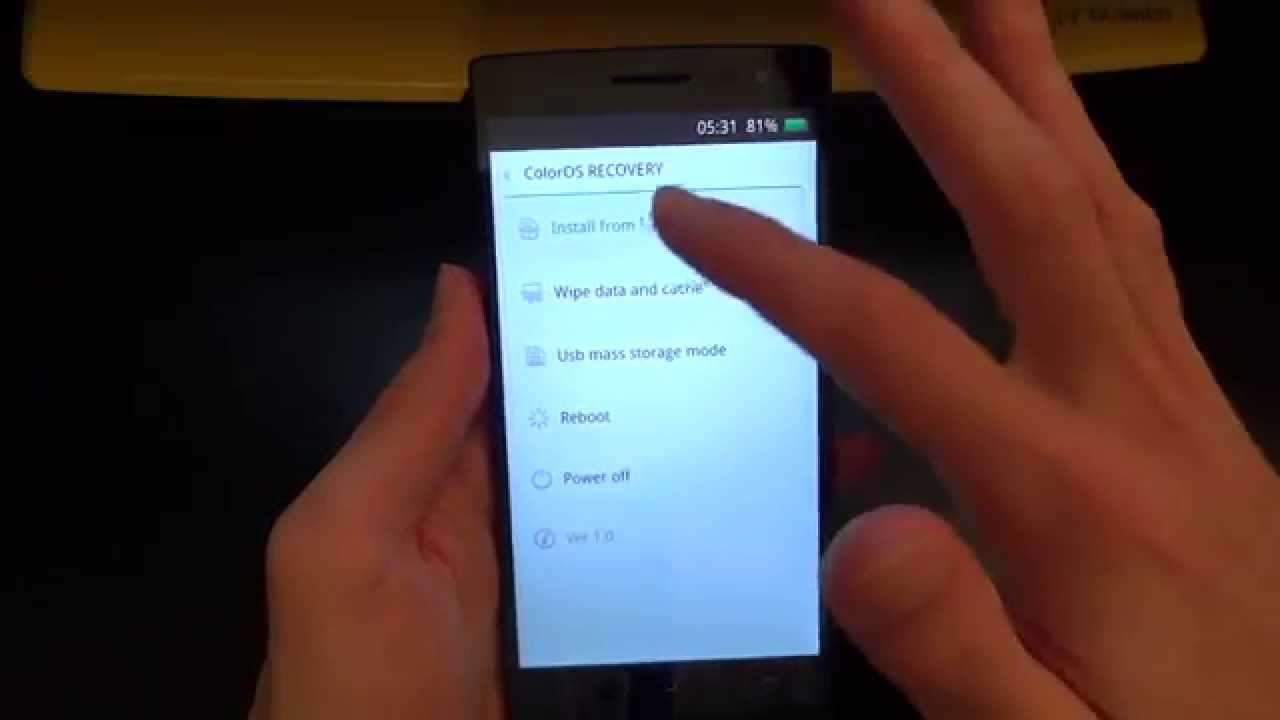
4. Kalo muncul kaya ginian berarti udah bener
5. Pilih bahasa, kalo gw sih bahasa English
6. Kalo muncul kaya ginian berarti udah bener
7. Pilih wipe data & cache biar kaga ada error nyisa
8. hapus semuanya
9. abis itu balik ke menu utama, pilih Install From SDcard, cari firmware yang udah lu download tadi trus install deh.
10. rebooting
11. Kalo sukses bisa masuk Home Screen, Alhamdulillah, kalo ngga ya nasib lu ke SC.

Credit : 
-. Allah yang Maha Pengasih dan Maha Penyayang, yang Menghidupkan dan yang Mematikan, semuanya tidak akan tercapai tanpa izinnya.
-. Bini Gw yang Cantik, makasih udah jadi penenang hati gw.
-. Semua anggota grup Find 5 Mini Indonesia di Facebook.

Kalo ada yang salah mohon dikomen & dibantu koreksi biar gw perbaiki.

Semoga aja lancar.

Rabu, 22 April 2015

Senin, 30 Maret 2015

Biar Virtualbox Bisa Akses USB Drive

1. Buka terminal emulator
2. ketik sudo usermod -aG vboxusers <username> 
3. Reboot

Minggu, 01 Maret 2015

Repartition for Oppo Find 5 Mini in English (for those who have the trouble of reading Bahasa Indonesia)

Download this first :

1. Root : 

-. http://www.mediafire.com/download/news51ms3sc226d/Root+Master+1.3.6_Cekas_Fix.apk
                                                                   OR
-. http://forum.xda-developers.com/attachment.php?attachmentid=2566341&d=1391850491
2. Custom Recovery : https://docs.google.com/uc?authuser=0&id=0B3WN8GSHAwdaVHdSUjBXNC03b2M&export=download make sure the file name is "R827cwmrecovery.img" and the file size is 5.31MB
3. Mobile Uncle tools : https://play.google.com/store/apps/details?id=com.mobileuncle.toolbox&hl=en
4. File Repartisi : https://docs.google.com/uc?id=0B2B2_MjfyDJQcG54QTVINzF1U2c&export=download
make sure the file name is "R827_Multi_Repartition.zip" and the file size is 1.10MB
5. Custom Rom : http://www.mediafire.com/download/gwevvg1gml1wlj6/ColorOS-1.2.2i-Dolby.zip Mirror : https://doc-0s-7s-docs.googleusercontent.com/docs/securesc/rf9mcj45khp65uojnqcu4lelov2fadcg/ctmto7mdktvs6tlasroijb90am83nv3c/1425002400000/14790082782668576339/14790082782668576339/0B3WN8GSHAwdadXF5a19IOE5KZVk?e=download
make sure the file name is "ColorOS-1.2.2i-Dolby.zip"
and the file size is 519.14MB
6. Put everything  outside of the "Downloads" folder, on "/SDcard" or the root of your SDcard.

Steps:

I. Rooting (if already rooted then skip this one)
   a. Framaroot

-. Install the "Framaroot-1.9.1.apk" & run it.
-. Choose "Barahir" &
reboot by itself.
-. Check if there is a SuperSU app on your applist, if it's there than you already rooted
-. Use "root Checker" to make sure you have root.

                                                                   OR (only if framaroot doesn't work for you)
   b. Key Root Master
-. Install the "Root+Master+1.3.6_Cekas_Fix.apk" & run it.
-. Choose "start Root" dan the Root button.
-. tap yes (the red one)
-. Wait until it's done.
-. Use "root Checker" to make sure you have root.

II. installing Custom Recovery
-. Run Mobile Uncle Tools

-. Tap Recovery Update & tap R827cwmrecovery.img
-. Tap OK until it reboot by itself.

III. Repartisi 2GB
-. Point the selection to "install zip from sdcard"
-.
Point the selection to "choose zip from sdcard"
-.
Point the selection to "R827_Multi_Repartition.zip", Point the selection to "yes"
-. Choose your Language by tapping on the screen, tap next and tap next again.
-. Tap thebox next to the "I Agree with this Term and Conditions..."
-. Tap the 2GB, tap Next, then tap install and wait patiently because repartition takes a lot of time and effort on your phone.

-. Reboot your phone.

IV. The 2.5 repartition with the "N" and the without one is very risky, there is 50% chance of getting BootLoop. The Steps were the same as the III but choose 2.5GB with "N" or without one.


V. Format everything
-. Point the selection to "mounts and storage"
-. Point the selection to "format /data", Point the selection to "yes"
-. Point the selection to "format /system", Point the selection to "yes"
-. Point the selection to "format /cache", Point the selection to "yes"

VI. Installing Custom Rom Color OS 1.2.2i
-.
Point the selection to "install zip from sdcard"
-. Point the selection to "choose zip from sdcard"
-.
Point the selection to "ColorOS-1.2.2i-Dolby.zip", Point the selection to "yes"

Credit :

-. Allah the most gracious and the most merciful, the one who brought the beginning and brought the end. All is naught without Allah's permission.
-. My lovely wife, thank you for being the one that gives comfort to my heart.

-. All of the Find 5 Mini Indonesia group members on Facebook.
-. Mr. Ajo Grage for the repartition file "R827_Multi_Repartition.zip" and custom rom "ColorOS-1.2.2i-Dolby.zip"
-. The one who owns the web http://www.inwepo.co/2014/02/cara-mudah-root-android-dengan-root-master.html for the how to root and the file.

Kamis, 26 Februari 2015

Bila Kecewa dengan Repartisi SC

Berdo'a Dulu Yah! Bismillaahirrohmaanirrohiim

Do With Your Own Risk. Lakukan dengan menanggung semua resikonya sendiri. Gw ga tanggung jawab kalo hape koit, rusak, bikin banjir Jakarta ato Tsunami Aceh.

Kumpulin Bahan dulu nih :
1. Root : http://www.mediafire.com/download/news51ms3sc226d/Root+Master+1.3.6_Cekas_Fix.apk
2. Custom Recovery : https://docs.google.com/uc?authuser=0&id=0B3WN8GSHAwdaVHdSUjBXNC03b2M&export=download pastiin nama filenya "R827cwmrecovery.img"
3. Mobile Uncle tools : https://play.google.com/store/apps/details?id=com.mobileuncle.toolbox&hl=en
4. File Repartisi : https://docs.google.com/uc?id=0B2B2_MjfyDJQcG54QTVINzF1U2c&export=download pastiin nama filenya "R827_Multi_Repartition.zip"
5. Custom Rom : http://www.mediafire.com/download/gwevvg1gml1wlj6/ColorOS-1.2.2i-Dolby.zip. Mirror : https://doc-0s-7s-docs.googleusercontent.com/docs/securesc/rf9mcj45khp65uojnqcu4lelov2fadcg/ctmto7mdktvs6tlasroijb90am83nv3c/1425002400000/14790082782668576339/14790082782668576339/0B3WN8GSHAwdadXF5a19IOE5KZVk?e=download. pastiin nama filenya "ColorOS-1.2.2i-Dolby.zip"

PERINGATAN : Tutor ini ditulis berdasarkan teori dan Trial & Error, baru tiga orang yg gw tau berhasil & teori ini berdasarkan pengalaman mereka. Langkah I - V punya persentasi 80%-100% BootLoop jadi ekstra hati2.

Langkah:
I. Root
-. Install aplikasi "Root+Master+1.3.6_Cekas_Fix.apk" & jalanin aplikasinya
-. Pilih "Mulai Root" dan tombol Root.
-. klik iya/yes (berwarna merah)
-. Tunggu hingga selesai proses rooting.
-. Jika sudah kemudian lihat menu aplikasi apakah sudah terinstal aplikasi "Perizinan Rumah Tangga".
-. Jika sudah terinstall berarti Android kamu berhasil di Root.
-. Kamu bisa cek menggunakan root checker.

II. Pasang Custom Recovery
-. Jalanin aplikasi Mobile Uncle Tools
-. Pilih Recovery Update & pilih R827cwmrecovery.img
-. Pilih OK sampek reboot.

III. Repartisi 2GB
-. Arahkan seleksi ke "install zip from sdcard"
-. Arahkan seleksi ke "choose zip from sdcard"
-. Arahkan seleksi ke "R827_Multi_Repartition.zip", Arahkan seleksi ke "yes"
-. Pilih Bahasa dengan tap di layar, tap next, tap next lagi.
-. Tap lagi kotak sebelah kirinya "I Agree with this Term and Conditions..."
-. Tap 2GB, tap Next, kemudian tap install dan bersabar karena proses makan waktu sangat lama

IV. Hapus Semuanya
-. Arahkan seleksi ke "mounts and storage"
-. Arahkan seleksi ke "format /data", Arahkan seleksi ke "yes"
-. Arahkan seleksi ke "format /system", Arahkan seleksi ke "yes"
-. Arahkan seleksi ke "format /cache", Arahkan seleksi ke "yes"

V. Pasang Custom ROM Color OS 1.2.2i
-. Arahkan seleksi ke "install zip from sdcard"
-. Arahkan seleksi ke "choose zip from sdcard"
-. Arahkan seleksi ke "ColorOS-1.2.2i-Dolby.zip", Arahkan seleksi ke "yes"

PERINGATAN : Lakukan langkah ke VI hanya apabila sudah berhasil masuk ke Color OS 1.2.2. Kemungkinan BootLoop juga besar, tapi masih bisa diperbaiki. KHUSUS YANG BANYAK NYALI.

VI. Repartisi 2.5GB, Peringatan : Hanya Jika punya keberanian untuk melanjutkan, kemungkinan Bootloop bisa 50% bila ngga sesuai IC Storagenya, 75% jika anda hanya coba2 dan 100% jika anda panik.
-. langkah sama dengan IV, hanya pilih 2.5GB yang New atau yang First. Bila gagal, coba yang 2.5GB yang lainnya. Bila masih gagal, maka balik lagi aja ke 2GB, kembali ulang langkah V.

Credit : 
-. Allah yang Maha Pengasih dan Maha Penyayang, yang Menghidupkan dan yang Mematikan, semuanya tidak akan tercapai tanpa izinnya.
-. Bini Gw yang Cantik, makasih udah jadi penenang hati gw.
-. Semua anggota grup Find 5 Mini Indonesia di Facebook.
-. Bang Ajo Grage buat file repartisi "R827_Multi_Repartition.zip" dan custom rom "ColorOS-1.2.2i-Dolby.zip"
-. Yang punya web http://www.inwepo.co/2014/02/cara-mudah-root-android-dengan-root-master.html untuk langkah2 rootnya.
-. Yang punya kasus, Bang Dwi Seno dan Bang Hendra Kurniawan (maap bootloop, tapi gw jadi tau kesalahan gw dimana) yang udah sukses.
-. Bang Ahmad Jundah Thanks banget pengalamannya & koreksinya.

Kalo ada yang salah mohon dikomen & dibantu koreksi biar gw perbaiki.
Semoga aja lancar.